Parallel Uploads: “Why does this keep failing?”
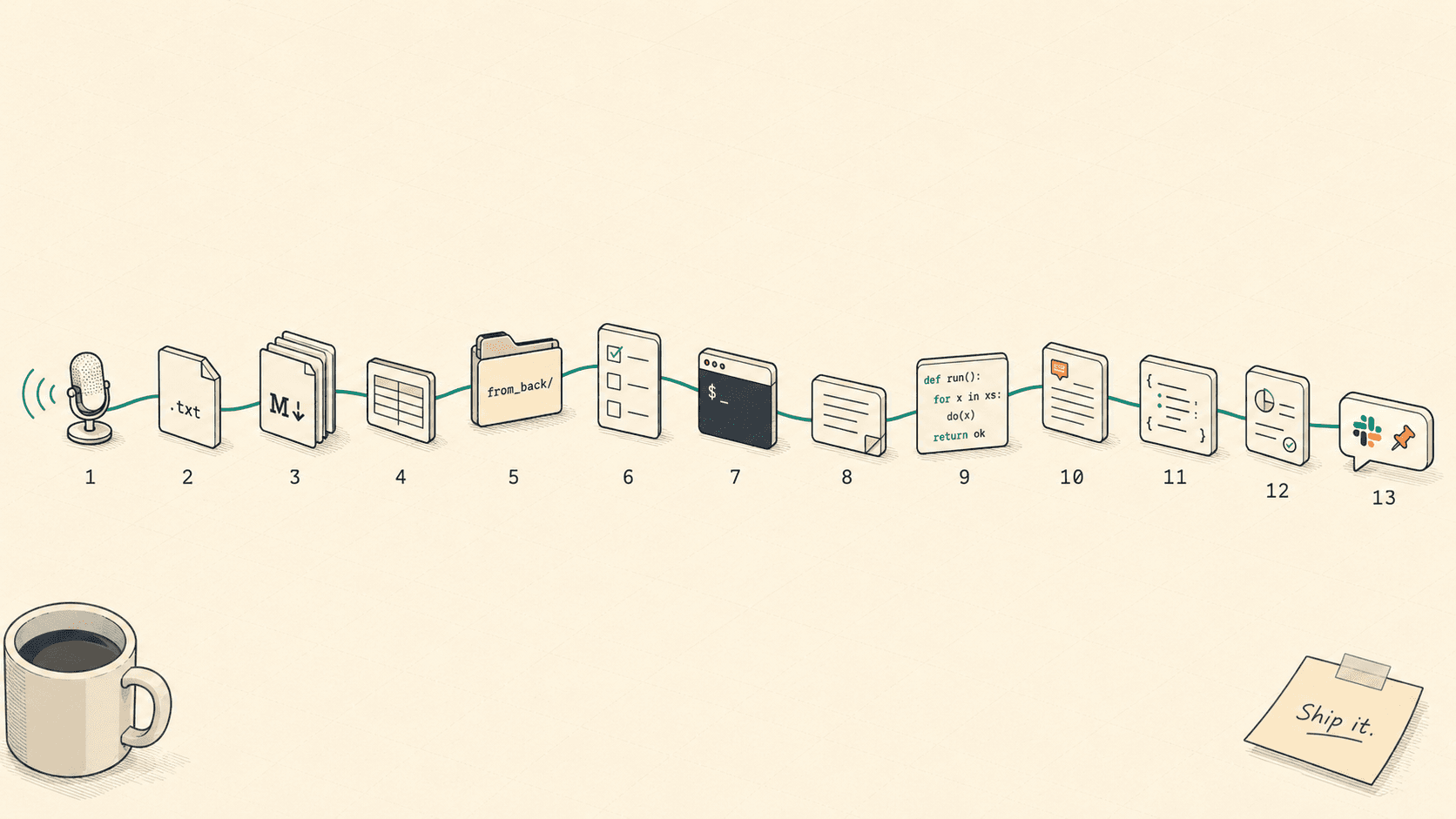
Frontend debug: multi-file upload partly failed; retries skipped successful files, ensuring safe, idempotent recovery.
We had a receipt upload screen that fired four files through
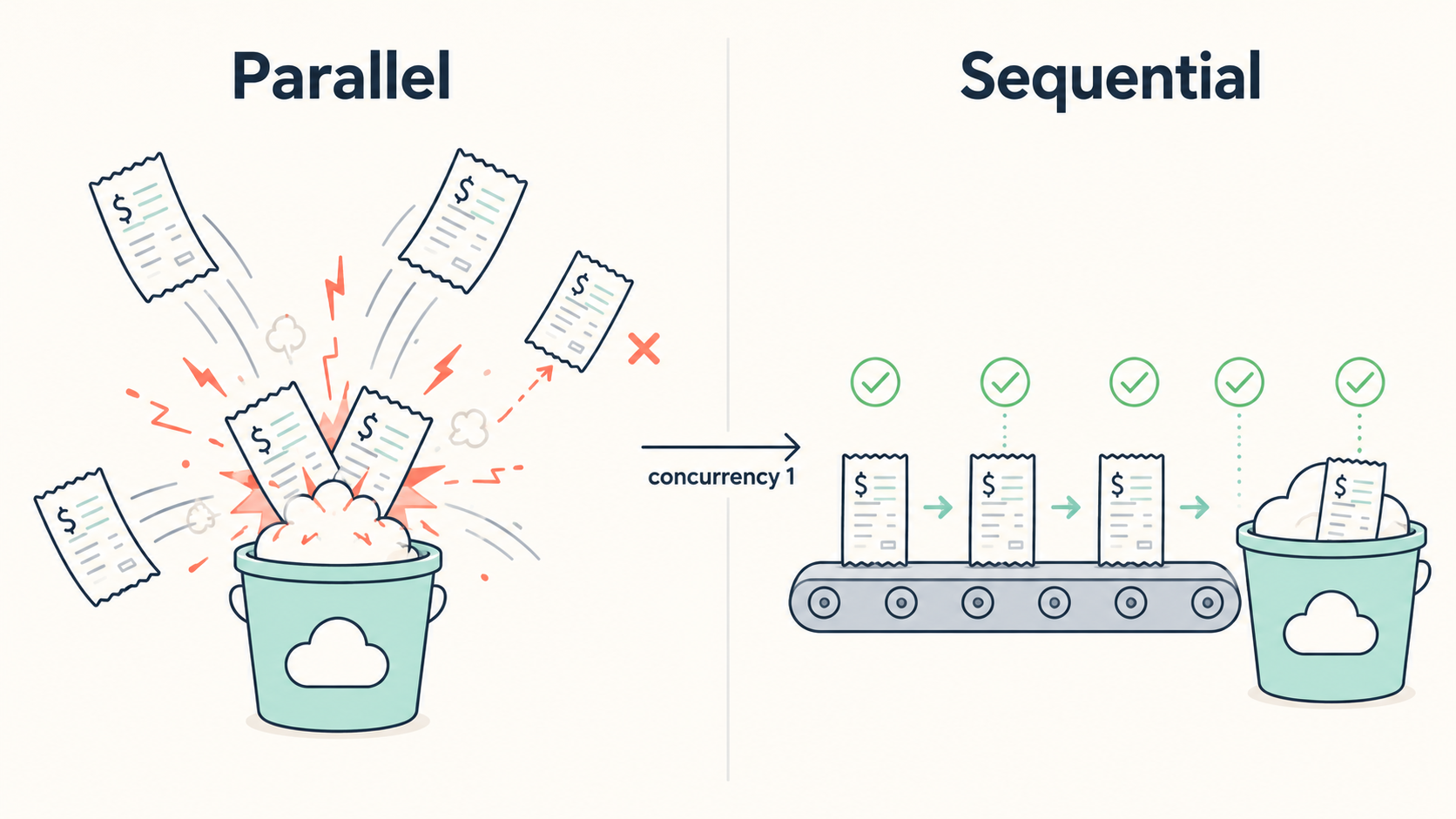
Promise.allSettled. Most days it looked fine. Then, every now and then, one or two files would slip because of S3/transaction collisions, and our ops team kept asking the same thing: "Can the user just press Confirm again?" This is the story of how we ended up with a one-by-one upload helper, anuploadedLogisticsIds: Set<number>to remember what already worked, and awasOpenRefto stop modal re-renders from wiping that memory. The goal was simple: if something already uploaded, don't touch it again; retry only what is still left.
Hi, I'm INSIK, a frontend developer on the BAS KOREA IT Team.
How are your multi-file upload screens doing? Once Promise.all or Promise.allSettled becomes familiar, it is very tempting to reach for it without thinking too much. In a service that has been running for a while, there is a good chance that somewhere in the codebase you have a quiet little block that says, more or less, "just throw all four at once." We had one too.
Let me first unpack the business flow a bit. The product we are building, "Flow MATE," is a B2B service for trade operations. In plain terms, it helps teams manage the path from a customer asking about goods, to getting a quote, placing an order, shipping the goods, and finally charging or settling the cost. In that flow, Logistics means the stage where the ordered goods are actually shipped and delivered. Invoice is the stage where the company uses that delivery result to bill, settle, or record the transaction.
In this kind of work, one uploaded file can carry a lot of weight. If the proof that the goods were delivered is missing, the person in charge cannot confidently say, "Yes, this shipment is done. We can move it to settlement." So a Confirm button is not just a button that closes a modal. It is closer to a checkpoint that says, "This data has been checked, and the next team can work from it." From the user's side, it matters a lot whether the file they just uploaded really stayed saved, and if something failed, exactly how far it got.
The screen in this post is the "Confirm Logistics" modal, the final confirmation step in that logistics stage. More generally, you can think of it as the screen where the user says, "This delivery is complete, so it is okay to hand it over to billing or accounting." At this moment, the user attaches a receipt of delivery — usually a PDF or image showing that the receiving side accepted the goods. That attachment later becomes the evidence operations or accounting relies on when they settle the shipment.
The messy part is that real work rarely looks like "one order, one document, one file." Several logistics documents can be tied to the same shipment, and users naturally want to confirm them together instead of repeating the same action one by one. So the modal was built to confirm not just the document currently open on the screen, but also a few related documents selected together. From the frontend's point of view, that meant receiving several proof files and uploading them to the server in one flow.
This post is the record of fixing that upload flow. At first, the screen uploaded several files at the same time, and every so often only some of them failed. We ended up changing the upload flow to process one file at a time, making sure files that already succeeded were not sent again on retry, and keeping the "already uploaded" state alive even when the modal re-rendered. I will also keep the messy parts in, because this was definitely not one of those clean "I saw the bug and fixed it in five minutes" stories.
This may be useful if you:
Run a screen that uploads several files at once and occasionally leaks partial failures
Have wondered how far you should trust
Promise.allorPromise.allSettledHave been bitten by a modal re-render wiping out state while the modal was still open
1. The Beginning — "Only 2 of 4 uploaded. Can I press it again?"
The same question started showing up in our operations Slack once or twice a week.

"When I press Confirm, only 2 out of 4 receipts get uploaded. Can I press it again?"
At first, I did not think too much of it. Maybe the user's network blinked. Maybe it was one of those one-off upload issues. But the same question came from different shippers, at different times of day, and it started to feel suspicious. So I opened the code again. The first version we shipped looked like this.
// src/features/logistics/components/logisticsList/detailModal/LogisticsConfirmModal.tsx (BEFORE)

// ❌ Before — Hurled all 4 at once and made S3 collide
const uploadTargets = getUploadTargets(selectedDocs, receiptFileByLogisticsId);
if (uploadTargets.length > 0) {
  const results = await Promise.allSettled(
    uploadTargets.map((t) => {
      if (t.orderId === undefined) {
        return Promise.reject(new Error(`orderId missing: ${t.docNumber}`));
      }
      return uploadReceiptAttachment(t.orderId, t.file);
    }),
  );

  const failedDocNumbers = collectFailedDocNumbers(results, uploadTargets);
  if (failedDocNumbers.length > 0) {
    customMessage.error(`Receipt upload failed: ${failedDocNumbers.join(", ")}`);
    return;
  }
}
On the surface, it looked reasonable. Send four uploads with Promise.allSettled, then block the confirm flow if any of them fail. But once I looked at it more carefully, three things bothered me.
First, we were assuming that parallel is always better because it is faster. Second, if the user retried after a partial failure, the files that had already succeeded would be uploaded again. Third, the failure path used return instead of throw, which meant later success handling could still continue in some cases. The third issue deserves its own post, so today I will focus on the first two: sending everything at once and making retry avoid duplicate uploads.
When the frontend sends another PUT for the same logisticsId, the backend treats it as a new upload. So the moment ops started saying "please press Confirm again," we had a path where the same receipt could be registered twice.
Before opening a PR, I asked an AI agent because something still felt half-organized in my head.
Me: In this 4-file upload flow, one or two files keep failing. Would it be enough to tell users they can just press Confirm again?
AI: With the current structure, successful and failed targets are mixed inside the same confirm attempt. If the user presses Confirm again, the frontend sends another PUT for logisticsIds that already succeeded. That can register the same receipt twice.
Me: Could the backend block that with a duplicate-request key or something similar?
AI: It could, but that work is scheduled for the next sprint, while the operations issue needs to be stabilized this week. Also, the frontend call site currently has no idea that some items already succeeded. Even after the backend changes, the frontend would still build and send the same file again.
Me: Right. So this is not just an error-message fix. The call site itself has to remember what succeeded and what failed.
AI: Exactly. One more thing: sending all four PUTs in the same millisecond looks like the direct trigger for the S3-side transaction collision. If the call site becomes "don't resend what already worked" plus "send only one at a time," you can reduce both problems in one change.
That conversation made the direction click. The thing to fix was not one line of Promise.allSettled. It was the structure of whether the call site remembers work it has already done. That became the starting point for this change.
2. The Cause — I thought parallel was the obvious answer
To be honest, my first reaction was to call it a backend or infra problem. "A few concurrent S3 PUTs break the flow? Shouldn't the server handle that?" That was my gut feeling. But after sitting with a backend teammate and reading the logs together, the picture changed. When four PUTs arrived almost at the same moment, two transactions tried to lock the same row and collided. One side then fell into a rejected state.
The backend team was already working on shrinking the transaction scope. The catch was that it would take another sprint or two, and ops needed the screen stabilized by the next week. So I brought up a slightly embarrassing proposal.
I think I reached for Promise.all because it was familiar, not because this screen actually needed it.
And I suggested that the frontend should reduce the pressure too. The decision was simple and conservative: set concurrency to 1. In other words, upload one receipt at a time. The line that stuck with me was this: "Reducing concurrency is not a defeat. When external resource consistency is involved, deliberately lining things up can be the safer answer."
We briefly looked at libraries like p-limit and bottleneck. But for a flow with at most four items, adding a new dependency felt heavier than the problem. So we decided to write a small helper ourselves, and revisit a library later if the same pattern spread to more batch screens.
3. Setting the Direction — "The call site only promises two things"
Once the direction was clear, the problem became much simpler. First decide what the call site promises; then turn that promise into code. We ended up with two promises.
Talk to the external resource one request at a time.
If an item has succeeded once inside the same modal, do not upload it again. Even if the user retries, leave finished items untouched.
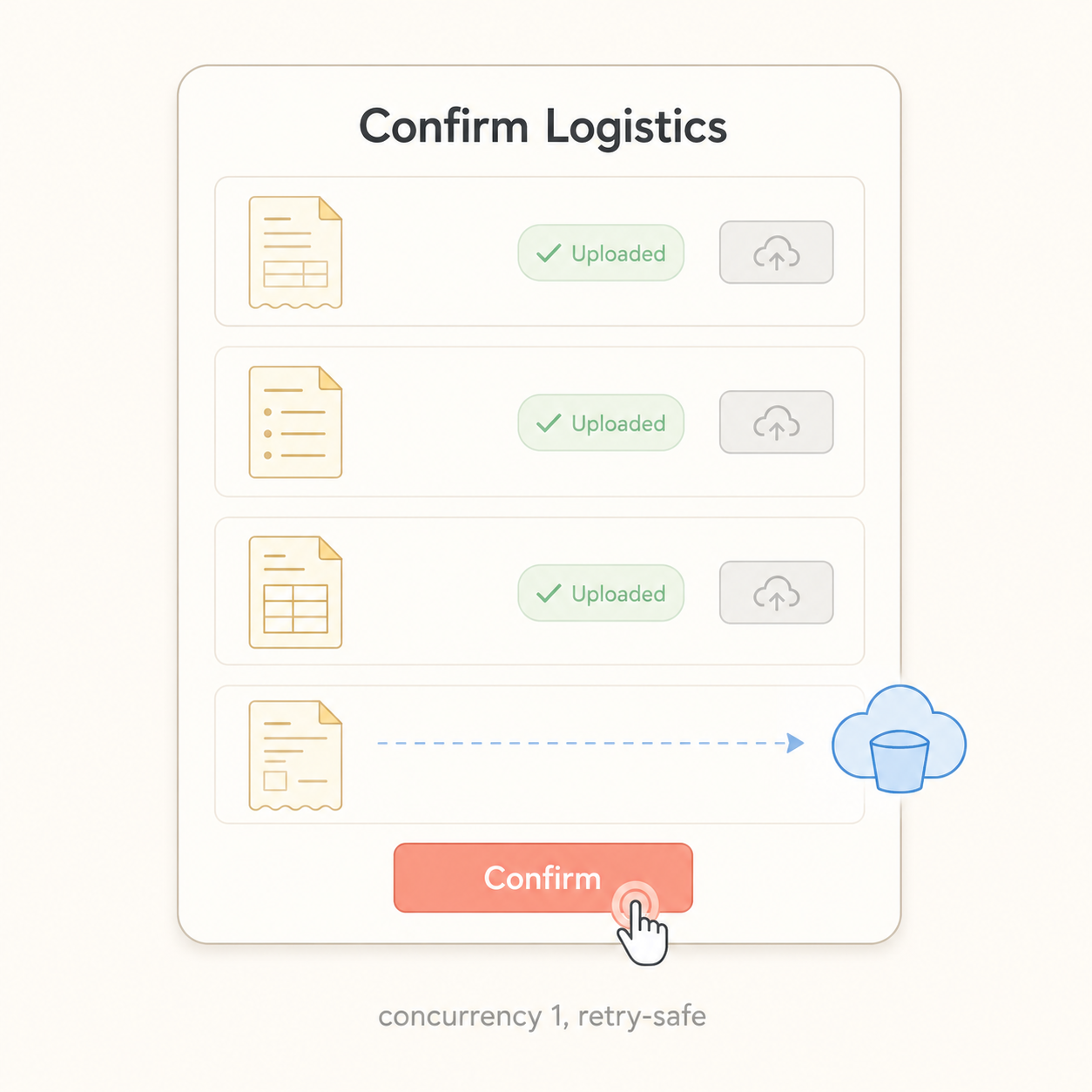
We also added one user-facing promise: make it obvious on the screen that successful uploads have not disappeared. We decided to show that twice: once in the toast message, and once as a badge on each row.
Split into responsibility layers, the plan looked like this.
Layer | Responsibility | Location --- | --- | --- Upload helper | Calls one by one, keeps going even if some fail | uploadReceiptsSequentiallyCall site (modal) | Remembers successful logisticsIds and skips them on retry | uploadedLogisticsIds: Set<number>UI row component | Shows finished rows and blocks file changes | disabled={isUploaded}Modal lifecycle | Initializes state only when the modal opens | wasOpenRef
Once this table existed, the implementation pieces were much easier to reason about. It was time to change them one by one.
4. Step 1 — Building a sequential version of Promise.allSettled
Before touching the implementation, I wrote the tests. I put six cases around a single helper, and the most important one checked whether it really calls uploads sequentially. That test had to exist because, at some point in the future, someone will ask, "Can we just use Promise.all again?" I wanted the test suite to answer before I had to.
// src/features/logistics/components/logisticsList/detailModal/confirmReceiptUploadUtils.ts

/**
 * Calls receipt upload targets sequentially.
 * Doesn't stop on failure — tries every target and returns the same shape as Promise.allSettled.
 */
export async function uploadReceiptsSequentially(
  targets: UploadTarget[],
  uploader: (orderId: number, file: File) => Promise<unknown>,
): Promise<PromiseSettledResult<unknown>[]> {
  const results: PromiseSettledResult<unknown>[] = [];

  for (const target of targets) {
    if (target.orderId === undefined) {
      results.push({
        status: "rejected",
        reason: new Error(`orderId missing: ${target.docNumber}`),
      });
      continue;
    }

    try {
      const value = await uploader(target.orderId, target.file);
      results.push({ status: "fulfilled", value });
    } catch (reason) {
      results.push({ status: "rejected", reason });
    }
  }

  return results;
}
I cared about three details in this helper.
First, the return type stays PromiseSettledResult<unknown>[]. The existing call site already had collectFailedDocNumbers(results, targets), which matches result entries to targets by index. Keeping the shape meant I could reuse that code almost untouched. Every time I do this kind of migration, I am reminded that interface compatibility removes a lot of pain.
Second, the helper does not throw on the first failure. It records the failure and moves on with continue. If two out of four files fail, uploading the other two is still better for the user. That is what later lets us say, "Only the failed ones need another try."
Third, when orderId === undefined, we still push a rejected result into the array. We do not make an upload call, but we do keep the index aligned. If this array shifted by even one slot, the failure message could show the wrong document number. That kind of bug is nasty because it looks plausible on the screen.
The most important test case looked like this.
// src/features/logistics/components/logisticsList/detailModal/confirmReceiptUploadUtils.test.ts

it("calls sequentially (not in parallel)", async () => {
  const callOrder: number[] = [];
  const uploader = vi.fn(async (orderId: number) => {
    callOrder.push(orderId);
    await new Promise((resolve) => setTimeout(resolve, 10));
    callOrder.push(orderId * 10);
    return { id: orderId };
  });

  const targets: UploadTarget[] = [
    { logisticsId: 1, docNumber: "D-1", orderId: 100, isCurrent: false, file: makeFile() },
    { logisticsId: 2, docNumber: "D-2", orderId: 101, isCurrent: false, file: makeFile() },
  ];

  await uploadReceiptsSequentially(targets, uploader);

  // Parallel would interleave like [100, 101, 1000, 1010].
  // Sequential must produce [100, 1000, 101, 1010].
  expect(callOrder).toEqual([100, 1000, 101, 1010]);
});
That one assertion, [100, 1000, 101, 1010], is the seat belt for this whole change. If someone quietly swaps the helper back to Promise.all, this test should start barking.
5. Step 2 — Keeping track of "already uploaded" items
The helper now calls uploads one by one. But that alone does not keep the promise of "do not upload successful items again." That responsibility belongs to the call site. So I added an uploadedLogisticsIds: Set<number> state inside the modal. It stores the logisticsIds that have successfully uploaded while the modal is open.
// src/features/logistics/components/logisticsList/detailModal/LogisticsConfirmModal.tsx

// 👍 After — one at a time, all the way through
// Receipt pre-upload: serialize to avoid S3 transaction collisions
const allTargets = getUploadTargets(selectedDocs, receiptFileByLogisticsId);
const pendingTargets = allTargets.filter((t) => !uploadedLogisticsIds.has(t.logisticsId));

if (pendingTargets.length > 0) {
  const results = await uploadReceiptsSequentially(pendingTargets, uploadReceiptAttachment);

  const newlyUploadedIds = pendingTargets.reduce<number[]>((acc, target, index) => {
    if (results[index]?.status === "fulfilled") acc.push(target.logisticsId);
    return acc;
  }, []);
  if (newlyUploadedIds.length > 0) {
    setUploadedLogisticsIds((prev) => {
      const next = new Set(prev);
      for (const id of newlyUploadedIds) next.add(id);
      return next;
    });
  }

  const failedDocNumbers = collectFailedDocNumbers(results, pendingTargets);
  if (failedDocNumbers.length > 0) {
    customMessage.error(
      `Receipt upload failed: ${failedDocNumbers.join(", ")} (${newlyUploadedIds.length} successful uploads are preserved. Press Confirm again to retry.)`,
    );
    throw new Error("Receipt upload failed");
  }
}
Four things matter in this flow.
First, pendingTargets = allTargets.filter(t => !uploadedLogisticsIds.has(...)). When the user presses Confirm again, items that already succeeded are removed from the upload targets. The PUT request for that logisticsId never even gets built.
Second, only fulfilled results are added to setUploadedLogisticsIds. We pin the success into modal state, and the next retry uses that state to skip the item.
Third, the failure path throws. It does not simply return. That also fixes the awkward path where later onSuccess handling could continue even though receipt upload had failed.
Fourth, the error message ends with this:
Receipt upload failed: receipt-A, receipt-B (2 successful uploads are preserved. Press Confirm again to retry.)
I honestly think that sentence made the biggest difference for users. The reason the "Can I press it again?" question disappeared was not only that the code became safe to retry. It was that the screen finally said, "The files you already uploaded are still there. Pressing Confirm again will not touch them." If a system is safe but the user cannot see that, it still feels unsafe.
6. Step 3 — Showing and locking finished rows in the UI
The toast message was not enough. Toasts disappear quickly, and the user is left staring at a four-row list wondering, "Which one worked and which one failed again?" So we added an "Uploaded" badge to each completed row.
// src/features/logistics/components/logisticsList/detailModal/ConfirmReceiptUploadList.tsx

selectedDocs.map((doc) => {
  const selectedFile = receiptFileByLogisticsId.get(doc.logisticsId);
  const isUploaded = uploadedLogisticsIds.has(doc.logisticsId);

  return (
    <RowItem key={doc.logisticsId}>
      <DocNumber>{doc.docNumber}</DocNumber>
      <FileName>{selectedFile ? selectedFile.name : "No file selected"}</FileName>
      {isUploaded && (
        <UploadedBadge data-testid={`uploaded-${doc.logisticsId}`}>
          <CheckCircleOutlined /> Uploaded
        </UploadedBadge>
      )}
      <Upload
        accept={ALLOWED_EXTENSIONS}
        showUploadList={false}
        disabled={isUploaded}
        beforeUpload={(file) => {
          if (validateFile(file)) onFileSelect(doc.logisticsId, file);
          return false;
        }}
      >
        <Button size="small" icon={<UploadOutlined />} disabled={isUploaded}>
          {selectedFile ? "Change" : "Upload"}
        </Button>
      </Upload>
    </RowItem>
  );
});
The important part is the two disabled={isUploaded} lines. Once a row has succeeded, the Change button is disabled, and file selection is blocked too. The promise "do not touch finished work" is enforced by the UI, not just by the upload logic.
The badge is not decoration. It is what makes the failure message believable. A toast can say "N successful uploads are preserved," but if the table does not show it, users hesitate. Once the row says "Uploaded" and the controls are locked, the user can actually trust that the item is done.
7. The Pitfall — The modal re-rendered and the state disappeared

It would have been nice if the story ended there. QA found the next problem.
QA: "Retry is not working. When I press Confirm again, even the rows that already uploaded are sent again."
I reproduced it and was honestly confused. I was clearly adding IDs to uploadedLogisticsIds, but at some point the Set became empty. Wait, did I miss something obvious? I stared at it for a while. The modal had not closed. The parent component had simply re-rendered once.
The cause was a familiar React trap that I still managed to step into.
// ❌ Before — formValues' object reference changes, so it resets every time!
useEffect(() => {
  if (isOpen) {
    const currentDoc: ConfirmDoc = {
      logisticsId,
      docNumber: formValues?.documentNumber ?? String(logisticsId),
      orderId: formValues?.orderId,
      isCurrent: true,
    };
    setSelectedDocs([currentDoc]);
    setReceiptFileByLogisticsId(new Map());
    setUploadedLogisticsIds(new Set());
    setDocNumberInput("");
  }
}, [isOpen, logisticsId, formValues]);
When the parent re-rendered, formValues came down as a new object reference. useEffect saw a dependency change and ran again. Inside it, setSelectedDocs([currentDoc]) and setUploadedLogisticsIds(new Set()) were still being called. So the modal stayed open, but its internal state was wiped clean. From the user's perspective: "I just saw that file upload successfully. Why is it being uploaded again?"
The fix had two parts.
// 👍 After — initialize only on open transition + narrow deps to the fields actually used
const wasOpenRef = useRef(false);

useEffect(() => {
  const shouldInitialize = isOpen && !wasOpenRef.current;
  wasOpenRef.current = isOpen;

  if (!shouldInitialize) return;

  const currentDoc: ConfirmDoc = {
    logisticsId,
    docNumber: formValues?.documentNumber ?? String(logisticsId),
    orderId: formValues?.orderId,
    isCurrent: true,
  };
  setSelectedDocs([currentDoc]);
  setReceiptFileByLogisticsId(new Map());
  setUploadedLogisticsIds(new Set());
  setDocNumberInput("");
}, [isOpen, logisticsId, formValues?.documentNumber, formValues?.orderId]);
The first part is wasOpenRef. It remembers the previous isOpen value, so initialization only runs when isOpen changes from false to true. The second part is narrowing the dependency array. Instead of depending on the whole formValues object, the effect depends only on the fields it actually reads: formValues?.documentNumber and formValues?.orderId. Both changes mattered. Fixing only one side would still leave another way for the state to disappear.
A React dependency array is not "everything this function received." It is "the values this effect actually reads." I had to learn that one again.
I did not want that lesson to live only as a comment, so I locked it in with a regression test.
// src/features/logistics/components/logisticsList/detailModal/LogisticsConfirmModal.test.tsx (excerpt)

it("keeps uploaded state when formValues reference changes while the modal stays open", async () => {
  const { rerender } = renderModal();

  fireEvent.click(screen.getByText("select-file-1"));
  clickConfirm();

  expect(await screen.findByTestId("uploaded-1")).toBeTruthy();

  // Parent re-renders → passes a freshly-constructed formValues
  rerender(
    <QueryClientProvider client={queryClient}>
      <LogisticsConfirmModal
        {...defaultProps}
        formValues={makeLogistics({ documentNumber: "LOG-001" })}
      />
    </QueryClientProvider>,
  );

  await waitFor(() => {
    // Despite the new reference, "Uploaded" must still be on screen
    expect(screen.getByTestId("uploaded-1")).toBeTruthy();
  });
});
The test opens the modal, uploads one item, then imitates the parent re-rendering with a newly constructed formValues object. After that, uploaded-1 still has to be visible. If someone later changes the dependency array back to the whole object, this test should catch it.
8. After Implementation — What changed in numbers
After release, I watched the screen for about a month. The result looked like this.
Metric | Before | After --- | --- | --- Partial failure on 4-item upload | 1–2x / week | 0 during observation window "Can I press it again?" ops tickets | Recurring | Stopped Re-upload of successful items on retry | Happened | Blocked Average upload time for 4 items | ~3.0s | ~4.2s
The upload time increased by about 1.2 seconds. On paper, that looks like a loss. In practice, receipt upload was already part of an async flow where users were doing other input work, and ops did not report a noticeable slowdown. On the other hand, partial failures dropped to zero during the observation window, and the recurring "can I press it again?" question stopped. That was very noticeable.
The biggest win was that users and ops could now feel confident about retrying. Ops no longer had to ask the dev team the same question every time, and we no longer had to answer, "Yes, it should be fine," over and over.
Regression coverage was split in two places. The six helper tests in confirmReceiptUploadUtils.test.ts lock down "this function calls uploads one by one." The two integration tests in LogisticsConfirmModal.test.tsx cover both "uploaded state survives re-render" and "state resets when the modal is closed and opened again."
9. Summary — The parts I want to remember
This got long, so here are the parts I would keep in my notes.
Do not blindly hit external resources in parallel. When S3, DB rows, or other shared resources sit underneath, parallel calls can make things worse. Sometimes a plain
awaitloop is the safer choice.A partial failure is not the same as data loss, but the screen has to say that. A message like "N successful uploads are preserved" plus a per-row "Uploaded" badge makes retry feel safe.
On retry, do not resend what already succeeded. Track successful items in a per-ID
Set, and clear it only when the modal is explicitly closed.A
useEffectdependency should be the value you actually read. Depending on a whole object can let one parent re-render wipe out child state.
Closing — Faster was not always better
In an earlier post about global error handling, I wrote that "errors are the final conversation with the user." This time I learned another version of the same lesson: success also has to be visible to the user. In trade operations, where one missing step can cascade into the next, even a partial success needs to be shown clearly: "this one is done, and this one is still left." Only then can the user decide what to do next without guessing.
Four receipts taught me that speed is not always the same as correctness. When the other side is an external resource, sending more at once is not always the fastest path. Sometimes the path that goes one by one gets you to a stable result sooner. What started as a small modal bug has now become the default pattern we think about for any Flow MATE screen that processes multiple items at once. Next, I want to extend this "remember successful items and retry only the rest" flow to other batch screens like Order bulk-confirm and Invoice bulk-issue.
Thanks for reading this long one. I hope the question "Can I press it again?" disappears from your inbox too.
Best regards, INSIK from the BAS KOREA IT Chapter Frontend.
Tags: React TypeScript File Upload Concurrency TDD Frontend Web Development