Large-Scale Migration for AI, by AI
How Flow MATE turned rules, handoffs, specs, and verification logs into an operating system for AI-led migration.
Hello. I'm INSIK HWANG from the BAS KOREA IT team, working on Flow MATE.
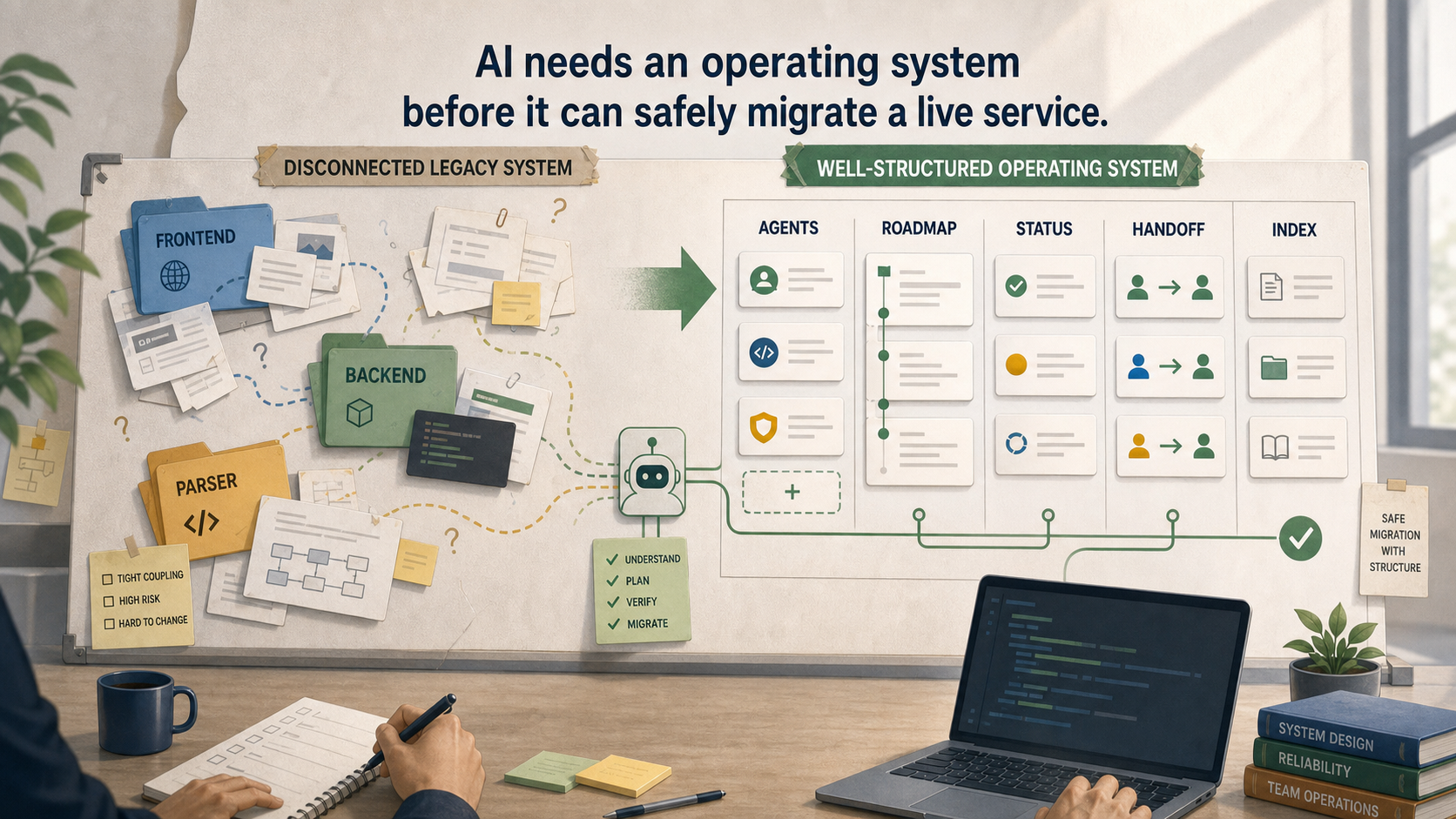
This post is about how we designed an operating system for AI work so that an AI agent could help move a live legacy service into a new monorepo. The point was not to write a longer prompt. It was to make sure AI could understand where it was, what it was allowed to touch, and what evidence it needed before saying a task was done.
1. Why We Started
Flow MATE was already a live service. The product flow runs from Inquiry to Offer, Order, Logistics, and Invoice. The frontend, backend, and parser each had important responsibilities, but they lived across different repositories and technology stacks.
That split was costly for people, and even more costly for AI agents. A single feature could require checking the frontend repository, the backend repository, and sometimes the parser. If the frontend and backend documents described an endpoint differently, the AI would drift just as easily as a human would.
The backend was also built with Java Spring. Java itself was not the issue. The issue was the feedback loop. Small changes could still require moving through controllers, services, DTOs, entities, and repositories, then waiting for a heavier compile and startup cycle. In AI-driven work, fast edit-and-verify loops directly affect quality.
The third constraint was the most important one: production could not become the experiment. Existing users, the legacy deployment, the production database, and infrastructure had to stay untouched unless there was an explicit decision to change them.
<!-- AGENTS.md -->
- legacy/ is read-only reference material.
- Production DB and AWS access are read-only for analysis.
- Production traffic and deployment settings are not changed before approval.
- The new system is built and validated in parallel.
So the real problem was not whether AI could write code. The problem was whether AI could keep working safely without losing context.
2. How It Actually Runs
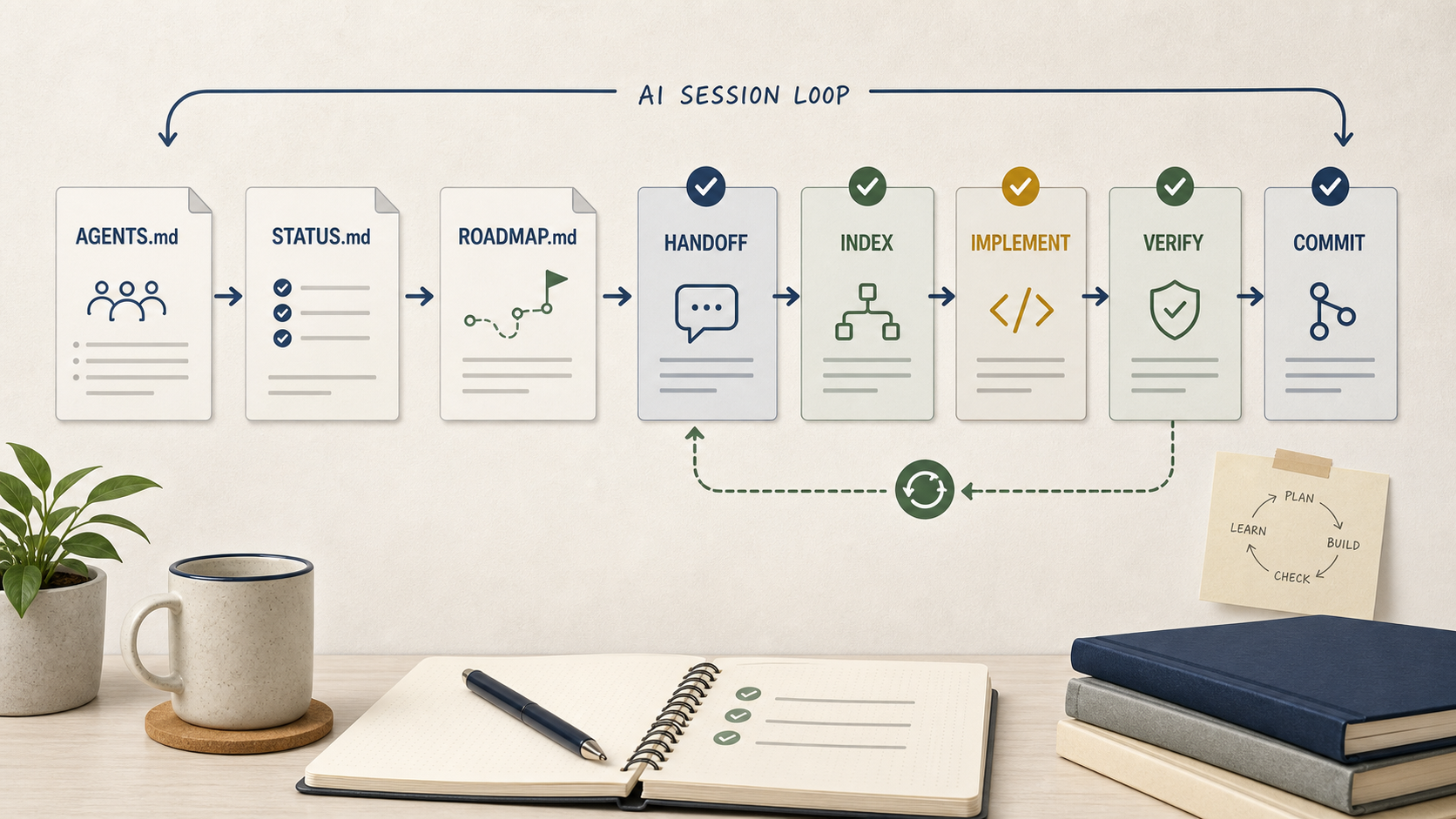
Before explaining the structure, it helps to show the first few minutes of a new AI session. In this repository, the agent does not ask me, "Where did we stop?" It reads the same files every time.
<!-- AGENTS.md -->
1. AGENTS.md
2. docs/STATUS.md
3. ROADMAP.md
4. docs/migration/handoff/stage-XX-handoff.md
5. Current stage input artifacts
docs/STATUS.md tells the agent the current phase and blockers. ROADMAP.md shows the active [>] stage. The handoff document explains what the previous session reported, which questions were asked, and what can continue next.
For implementation work, the loop is deliberately small.
<!-- ROADMAP.md / stage 5 -->
1. Re-check the spec
2. Write a slice plan
3. Add the test first
4. Implement
5. Compare with legacy behavior
6. Record feature deltas
7. Update INDEX and status docs
8. Run lint, typecheck, and focused tests
9. Commit
When there are independent tasks, we can split them into lanes. But the rule is not "parallel because there are many tasks." The rule is "parallel only when the write sets do not overlap." Subagents return drafts. The main agent is the only writer that applies changes, runs verification, and commits.
This kept the speed benefit of parallel work while keeping the responsibility point clear.
3. The Thinking Model
The phrase that kept coming back to me was harness engineering. Instead of trusting AI more because it sounds confident, we put a harness around how it works.
In simple terms:
"Do not just give AI a bigger prompt.
Build an environment where AI can repeatedly work safely."
In Flow MATE, that environment looks like this. AGENTS.md is the rulebook. ROADMAP.md is the map. docs/STATUS.md is the current position board. Handoff files are session memory. docs/specs/INDEX.md is the contract that prevents missing features. feature-deltas.md is where we record behavior changes instead of hiding them.
That also clarifies the split between people and AI. AI handles analysis, specs, implementation, tests, documentation updates, and commits. People keep ownership of architecture direction, production impact, security policy, and stage gates.
AI can hold the steering wheel for long stretches. But the destination and restricted zones still have to be set by people.
4. Design Structure
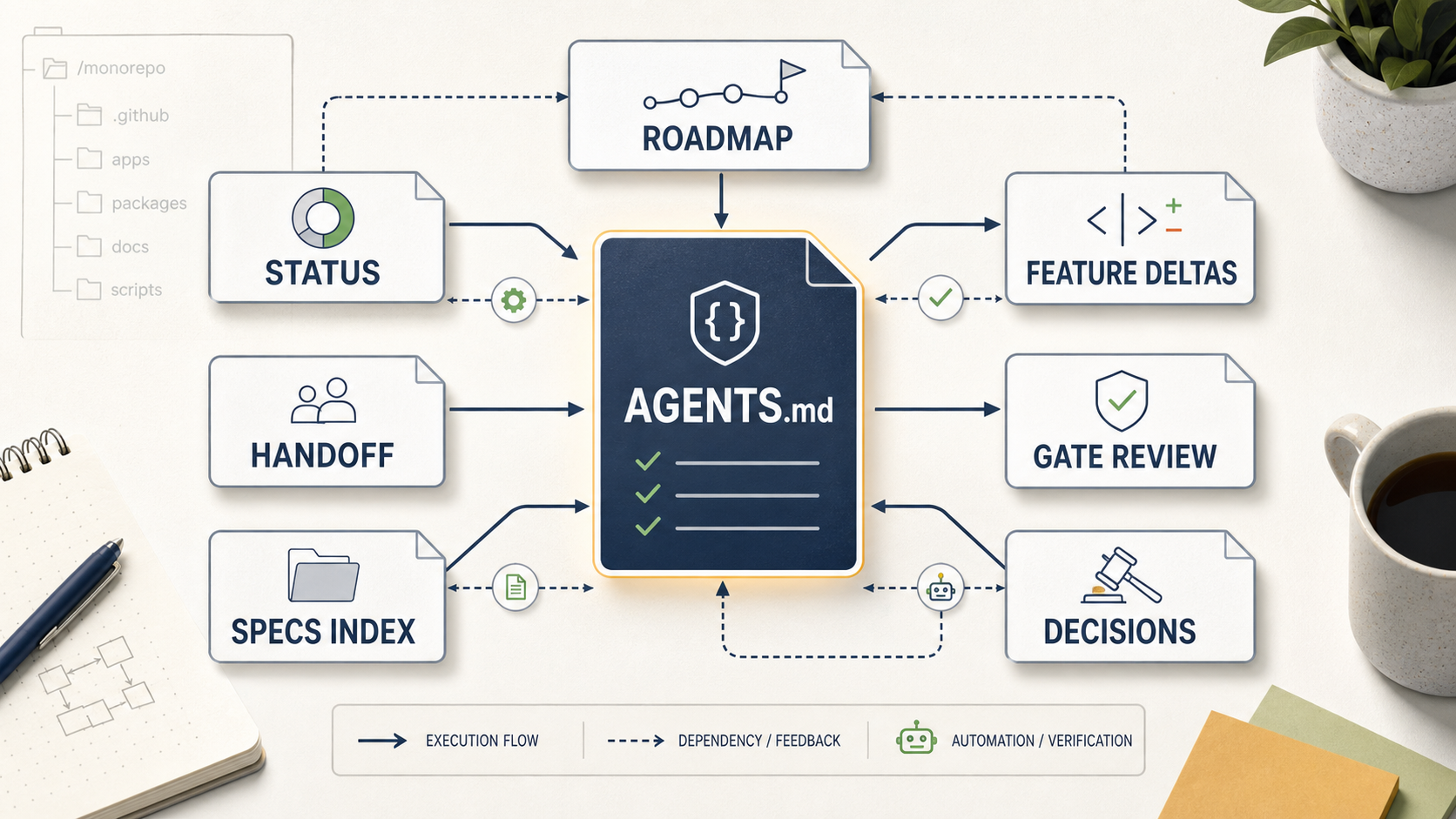
The core structure is intentionally plain markdown. That matters because markdown lives in the repository, shows up in git history, and can be read directly by the agent.
<!-- FlowMate migration document map -->
AGENTS.md
ROADMAP.md
docs/
├── STATUS.md
├── specs/
│   ├── INDEX.md
│   └── *.md
└── migration/
    ├── handoff/
    │   └── stage-05-handoff.md
    ├── plans/
    │   └── *-slice-plan.md
    ├── validation/
    │   └── feature-deltas.md
    ├── reviews/
    │   └── stage-XX-gate-review.md
    └── decisions/
        └── *-decision.md
Each file has a job. AGENTS.md is the canonical rule source. ROADMAP.md prevents stage skipping. STATUS.md keeps the next session from asking the same setup questions. Handoff documents preserve reports, questions, and answers. INDEX.md keeps the full feature inventory visible.
The most important piece is docs/specs/INDEX.md. It is not a progress brag sheet. It is a defensive contract against the phrase "the main features are done." Routes, API calls, backend mappings, jobs, parser endpoints, and database objects are all accounted for there.
Without an index, AI tends to finish what is easiest to see. With an index, unfinished work stays visible.
5. How We Implemented It
The first implementation was not code. It was fixing the rules.
Early on, letting AI work too freely created familiar issues: documents were not updated, completion was declared without verification, decisions were treated as assumptions, and unrelated changes crept into the diff. That is why AGENTS.md became detailed.
<!-- AGENTS.md summary -->
C4. Every task is accompanied by documentation.
C6. legacy/ is read-only.
C8. AI proceeds autonomously, but key decisions go to the user.
C10. Reports, questions, and answers are recorded in files.
C16. lint and typecheck are required before completion.
C18. PASS must be evidence-based.
C20. Autonomous implementation starts with lane orchestration.
Then we split the migration into stages: workspace setup, legacy analysis, stack decision, monorepo skeleton, feature specs, database redesign foundation, vertical slices, parity verification, and parallel deployment validation.
Stage 5 is where the daily work happens. A feature becomes a slice. A slice gets a plan. A plan gets tests. Implementation follows. The result updates the spec index, status docs, handoff, and git history.
For parallel lanes, subagents do not directly write to the working tree. They read the latest state and return the full draft content. The main agent reviews and applies it. Shared chokepoints like Prisma schema, package barrels, app modules, lockfiles, and status documents are merged serially by the main agent.
That small rule saved a lot of confusion. Parallel work is useful, but only when the merge point is controlled.
6. Verification System
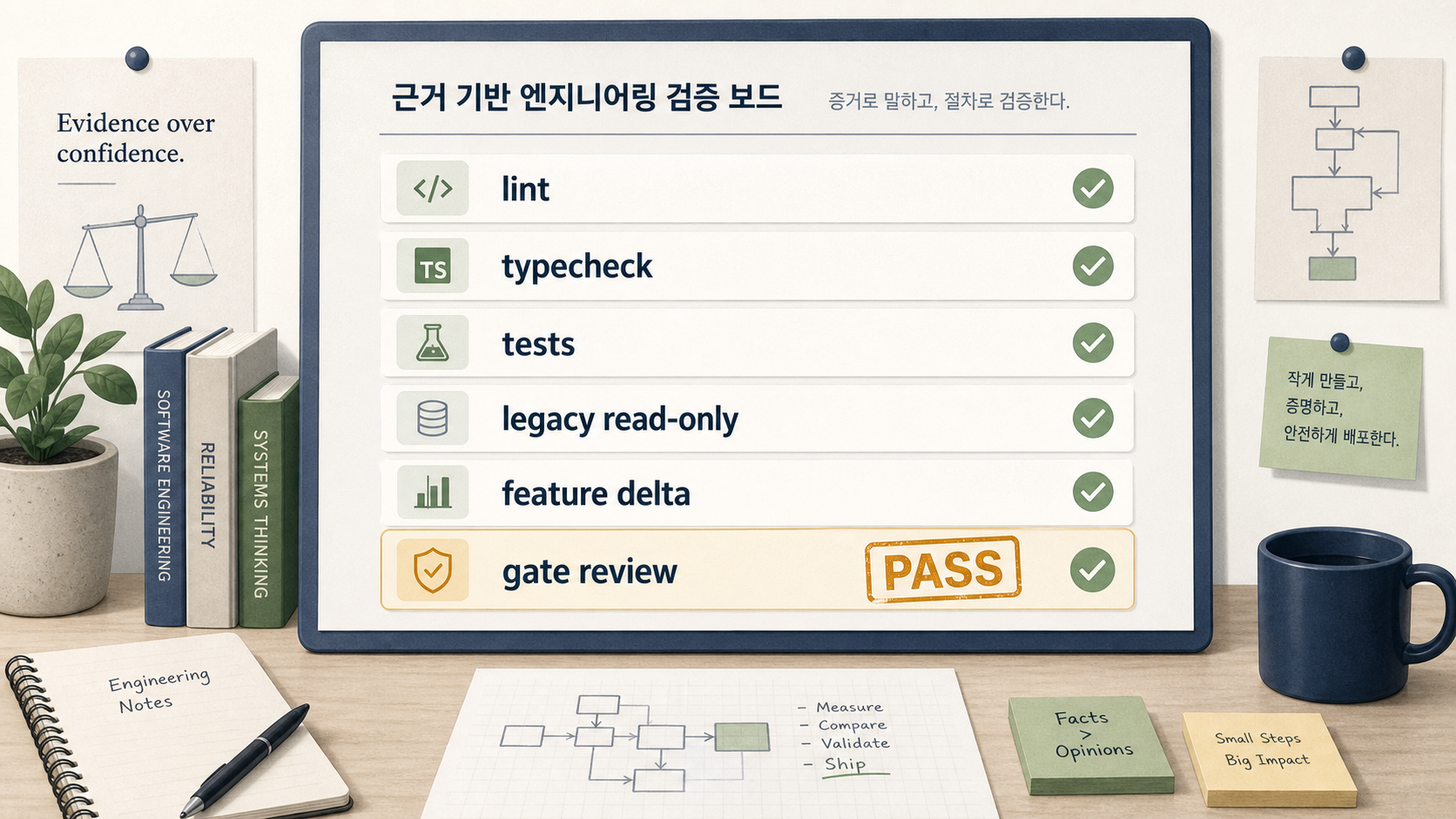
The most important rule is simple: we trust logs more than confidence.
For code changes, the baseline gate is:
<!-- repo root -->
pnpm lint
pnpm typecheck
UI work adds UI guardrails. Stage gates add migration-gate verification. Focused tests run around the changed slice.
But verification is not only about commands. The agent must also confirm what changed, whether legacy/ stayed untouched, whether Prisma code uses schema camelCase, whether feature deltas were recorded, and whether a separate reviewer checked stage completion.
That last part matters. The main agent does not approve its own stage. A separate subagent writes the gate review. If that review fails, the project does not move to the next stage.
For production safety, the rule is even stricter. Existing production systems are read-only for analysis unless there is an explicit user-approved operational step. Technical ability and permission to act are different things in a live service.
7. Extension Cases
After this structure started working for migration, the same pattern naturally extended to other workflows.
The reusable parts are not Flow MATE-specific:
Fix the new-session entry order.
Keep a live status file.
Use an index as a missing-work contract.
Make production impact explicit.
Record behavior differences instead of hiding them.
Separate draft-producing subagents from the main writer.
This blog workflow uses the same idea. The interview cleanup stays separate from the blog-source markdown, and the blog-source markdown stays separate from the DynamoDB JSON output.
<!-- docs/tech-blog workflow -->
docs/blog/series-01-ai-for-ai-migration-interview-clean.md
  → tech-blog-source
  → docs/tech-blog/blog-source/01-ai-for-ai-migration-blog-source.md
  → tech-blog-post
  → DynamoDB JSON
The source document preserves the reasoning. The JSON matches the publishing format. If the final writing needs to change, we do not have to rebuild the source material.
8. Results and Effects
I do not have a clean dashboard that measures every effect. What I do have is a very concrete change in the daily workflow.
When a session restarts, I no longer need to reconstruct the project state by memory. The agent reads the rulebook, status board, roadmap, and handoff. When a feature is implemented, it is tied back to a spec and an index. When behavior differs from legacy, it has a place to be recorded.
Parallel work also became safer. Instead of many agents writing into the repository at once, subagents return drafts and the main agent integrates them. That makes the work faster without letting responsibility spread out invisibly.
The biggest change is where my attention goes. I spend less time repeating context and more time checking direction, production impact, security policy, and gate decisions.
AI does more of the execution. That means people have to be more deliberate about the boundaries.
9. Closing
The biggest lesson from this migration was that giving work to AI starts with making it harder for AI to get lost.
AI can write code, update documents, run tests, and prepare commits. But it does not carry responsibility for a live service. That still belongs to us. So the safest way to trust AI was not trust alone. It was constraints, documents, verification, and a repeatable operating loop.
Thank you for reading.
INSIK HWANG
BAS KOREA · Frontend Engineer